How to Disable Activity Status on Instagram
Apr. 2, 2022-
First, to familiarize you with the Activity Status feature,this is how the “last active” tab and the tag under the usernames of peopleyou have recently messaged will look like:
-
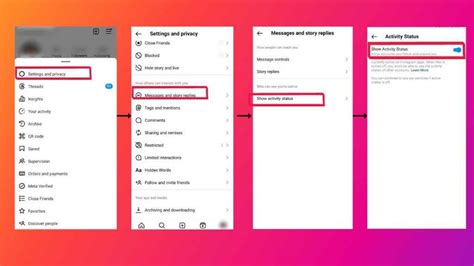
To disable activity status on Instagram, open your Instagram profile, tap the hamburger menu (horizontal three lines icon) at the top-right corner, andchoose “Settings”.
-
When the Settings page appears, move to the “Privacy” section and tap on “Activity Status” to change your Instagram account’s activity status.
-
Now,disable “Show Activity Status,”and you are all set. Other Instagram users will no longer be able to see your online status. Do keep in mind that you will also not be able to see the last seen status of people you text when you disable the activity status.
-
As you can see in the image below,the “online now” bar at the top has vanishedafter disabling the activity status. You won’t see the “active <minutes/hours> ago” tag either.
Remove Instagram DM’s Online Status Section
Disabling the “Activity Status” feature on Instagram will enable you to keep your business to yourself. It will help restore your privacy, keeping all those nosy friends and relatives at bay. While the newly introduced Instagram polls and quick post sharing are useful, we think adding a section to expose your online status was unnecessary. What are your thoughts on this update? Do you think it will come in handy, or is it just better to disable it? Let us know your opinions in the comments below.
Subin writes about consumer tech, software, and security. He secretly misses the headphone jack while pretending he’s better off with the wireless freedom.
