What Are Instagram Broadcast Channels and How to Join Them?
Feb. 20, 2023Meta CEO Mark Zuckerberg just recently announced Instagram’s take on the Telegram Channel feature with the introduction of Broadcast Channels. Zuckerberg debuted the feature through his own broadcast channel, where he intends to share future Meta-related updates with his followers. Initially,channels areavailable to select creatorsin the US, but Meta plans to expand the feature to more creators and users in the coming months. However, if you are eager to learn more about broadcast channels on Instagram, along with the steps to create a new channel and how to join them, then you have come to the right place. In this article, we will take an in-depth look at the Instagram Broadcast Channel feature.
Before we explain what Instagram Broadcast Channels are, note that the rollout is limited at the moment. Moreover, you can currently use the broadcast channels feature only on your smartphone, as it is not yet available on the desktop website. Continue reading to learn what is an Instagram Broadcast Channel and how you can join one.
What Are Instagram Broadcast Channels
With the introduction of Broadcast Channels, Meta aims to equip creators with the ability to closely communicate with their audience anddevelop deeper connections with their communitieson Instagram.
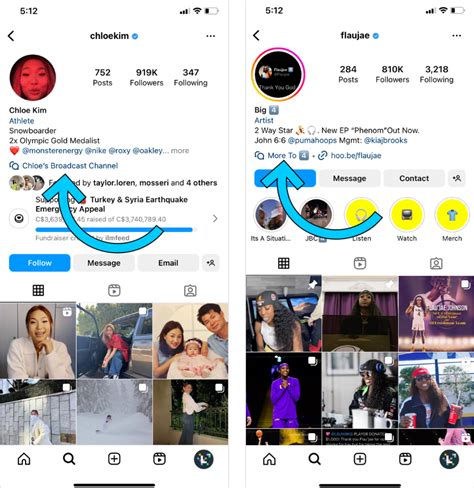
As a creator, you will be able to create a one-to-many public messaging channel to interact with your audience at scale.Only you will be able to send messageson your broadcast channel. You can invite your followers to join your channel by sharing the link via Instagram Stories. You can also update your profile and add the Broadcast channel link in yourInstagram bio.
An important thing to note here is that the broadcast channel is accessible only to your “Followers”. That means if someone wants to join your community, they will first have to follow you. Then only will they be able to gain access to your Broadcast channel. As mentioned in the officialblog post, as a creator, Broadcast channels will help you to engage with your most interested fans.
Being a follower, you can“read, react and vote”on your favorite creator’s messages, updates, and polls. Broadcast channels will focus more on exclusivity, as indicated by Mark Zuckerberg. That means you can closely keep track of your favorite artists or Twitch streamers when you join a channel.
Creators can share exclusive content and updates on their channels before they are made available publicly. That means you can get access to crowdsource polls andchannel exclusive contentlike behind the scene moments, texts, photos, videos, and voice notes, among other things.
You can follow the steps below to easily join the Broadcast Channel of your favorite creators, provided you are following them on the social media platform.
Meta is currently testing Broadcast Channels with a handful of creators in the US. However, if you are a creator who wishes to gain access to the broadcast channels feature and build a community on Instagram, you can fill outan early access form(visit). Just open the link attached here and click the “Request early access” button. You will receive a confirmation once the feature is enabled on your account.
Once you get access, you can start a Broadcast channel from your Instagram Inbox. After creating your Broadcast channel by populating it with the required details, you can broadcast your first message. Further, as stated above, sending the first broadcast message will trigger aone-time notification, intimating your followers to join your channel.
If you are looking to check out the feature works, here are the creators that are a part of the early access program of Broadcast channels. Head to their profile (on your smartphone) and look for the Broadcast channel link in their profile.
Bringing the latest in technology, gaming, and entertainment is our superhero team of staff writers. They have a keen eye for latest stories, happenings, and even memes for tech enthusiasts.
